Documentation
Web Direct POS Print
Print receipts instantly from any web POS — no dialog, no delay.
A desktop bridge app that connects your web-based POS directly to a local printer
(dot matrix LPT or thermal POS) over a local HTTP server at http://localhost:3535.
Your web app sends a single fetch POST and the receipt prints immediately —
no browser print dialog, no driver pop-ups. The app minimizes to the system tray when closed —
the HTTP server keeps running in the background.
Features
- Local HTTP server on port
3535with open CORS (callable from any origin) - Raw printing — ESC/P and ESC/POS commands are sent as-is to the printer
- Printer support:
- macOS/Linux: CUPS (
lp -o raw), or direct device path (/dev/usb/lp0) - Windows: RAW spooler (winspool) for printers with a driver, or direct write to
LPT1/COM3for parallel dot matrix without a driver
- macOS/Linux: CUPS (
- ESC/POS helpers: paper cut (
cut), cash drawer (drawer), form feed - System tray icon — close button hides to tray, HTTP server keeps running
- UI for selecting the default printer, test print, and real-time job log
- Browser support: Chrome, Firefox, Edge, and other Chromium-based browsers — not Safari
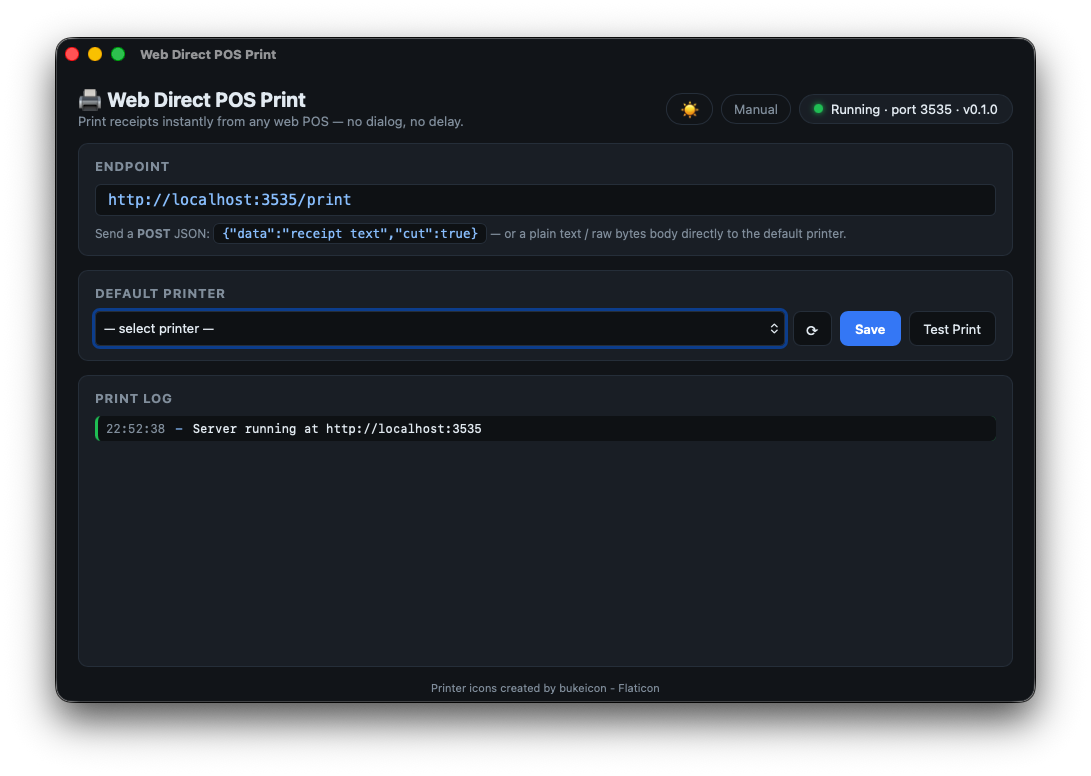
Menu bar interface — endpoint, printer selector, and live print log
API Reference
GET /status
Check if the app is running.
{
  "status": "ok",
  "app": "printer-bridge",
  "version": "0.1.0"
}
GET /printers
List available printers and the current default.
{
  "printers": ["EPSON_LX310", "POS58"],
  "default": "POS58"
}
POST /print — Field Reference
Send a JSON body with Content-Type: application/json. A non-JSON body (text/plain / application/octet-stream) is sent as-is to the default printer.
| Field | Type | Description |
|---|---|---|
printer |
string | Printer name. Omit to use the default printer. |
data |
string | Text to print (alias: text). |
base64 |
string | Raw bytes encoded as base64 (logos, barcodes, binary ESC/POS commands). |
feed |
number | Number of extra line feeds appended at the end. |
cut |
boolean | Cut paper (ESC/POS GS V) — for thermal POS printers. |
drawer |
boolean | Open cash drawer (ESC/POS ESC p). |
formfeed |
boolean | Send form feed 0x0C — for dot matrix continuous form. |
qr |
string | Text/URL printed as an ESC/POS QR code (center-aligned). |
qr_size |
number | QR module size 1–16 (default 6, ≈3 cm on 80 mm paper). |
logo |
string | PNG/JPEG image URL — downloaded and printed as a bitmap at the top. |
logo_width |
number | Logo print width in pixels (default 300, max 576 for 80 mm paper). |
logo_text |
string | Text to the right of the logo (use \n for line breaks). When set, the logo is scaled small and layout becomes [logo │ text]. |
logo_size |
number | Logo box size when displayed beside text, in pixels (default 88). |
http://localhost — browsers treat localhost as a secure context, so there is no mixed-content block.
Safari is not supported — it blocks these local requests. Use Chrome, Firefox, Edge, or another Chromium-based browser.
Integration Examples
// Minimal — print to default printer, cut & open drawer
await fetch("http://localhost:3535/print", {
  method: "POST",
  headers: { "Content-Type": "application/json" },
  body: JSON.stringify({
    data: "receipt text...\n",
    cut: true,
    drawer: true,
  }),
});
// Full receipt — logo, QR code, cut & drawer
await fetch("http://localhost:3535/print", {
  method: "POST",
  headers: { "Content-Type": "application/json" },
  body: JSON.stringify({
    logo: "https://example.com/logo.png",
    logo_text: "Example Company\nExample Subtitle",
    logo_size: 88,
    data: "================================\n"
        + "   EXAMPLE COMPANY\n"
        + "   123 Example Street\n"
        + "================================\n"
        + "No  : INV/2026/06/00001\n"
        + "Date: 15-06-2026  10:32:45\n"
        + "--------------------------------\n"
        + "Name   : JOHN DOE\n"
        + "--------------------------------\n"
        + "Service Charge:    45,000\n"
        + "TOTAL DUE     :    47,500\n"
        + "================================\n"
        + "  Thank you for your payment.\n",
    qr: "https://example.com",
    qr_size: 6,
    feed: 3,
    cut: true,
    drawer: true,
  }),
});
// Thermal POS — feed before cut so last line isn't cut off
await fetch("http://localhost:3535/print", {
  method: "POST",
  headers: { "Content-Type": "application/json" },
  body: JSON.stringify({
    data: "receipt text...\n",
    feed: 4,
    cut: true,
  }),
});
// Dot matrix LPT — feed to tear bar (calibrate once per printer)
LX-310 is typically 5–7 lines from print head to tear bar.
await fetch("http://localhost:3535/print", {
  method: "POST",
  headers: { "Content-Type": "application/json" },
  body: JSON.stringify({
    printer: "LPT1",
    data: "receipt text...\n",
    feed: 6,
  }),
});
// Dot matrix — continuous form with fixed page length
await fetch("http://localhost:3535/print", {
  method: "POST",
  headers: { "Content-Type": "application/json" },
  body: JSON.stringify({
    printer: "LPT1",
    data: "receipt text...",
    formfeed: true,
  }),
});
Questions? Contact the developer at [email protected]